4 ready-to-use prompts · $0 forever · No code
Claude · dForms connected
You: “Create my quote form with 3 budget ranges and give me the link.”
Claude: “Done. Your form is live: app.dforms.ai/…/f/quote-your-project”
Inside:
- Quote with budget
- 5-question quiz
- The form people actually finish
- 3 questions before the call
Before you start: why a form that qualifies beats “Contact us”
A “Contact us” form asks for name, email and message, and gives nothing back. People don't know what to write, so they leave. The few who fill it out all look the same: the one ready to buy today and the one just browsing. You call everyone, and meanwhile your best prospect goes cold.
A form that qualifies asks the questions for you before you talk to anyone. Every answer adds points, so you know who to call first, what to offer and what not to promise.
| Before: “Contact us” | Now: “Get your quote in 24 hours” |
|---|---|
| Name, Email, Message, Submit | What do you need? Website (+0) · How much are you planning to invest? Over $2,000 (+3) · When do you want it? This month (+3) · Get my quote |
| ✕ Nobody knows what to write | ✓ One-click questions |
| ✕ Everyone looks the same | ✓ Every answer adds points |
| ✕ You call blind | ✓ You call the real buyer first |
| Hot lead · 6 points · call today |
How to use this guide: 3 steps, one afternoon
- Create your free account (step 1). At app.dforms.ai, with your email or your Google account.
- Connect dForms to your AI (step 2). Just once, in Claude or ChatGPT. No API key.
- Paste the prompt (prompts 01 to 04). Pick the template from the video you watched and your AI creates the form.
The rule: the questions you ask on the call, ask them in the form. Save the call for the one thing that's worth your time: selling.
Step 1: create your dForms account, free
dForms is a free AI form builder: no plans, no response limits and no credit card. You sign in with a Dapta account (the company behind dForms), which is also free.
- Open app.dforms.ai on your computer.
- It takes you to the Dapta sign-in screen. If you don't have an account yet, create one right there with Google, Microsoft, LinkedIn or your email.
- The first time, you'll see a short setup: Your account, Get to know you and Your first form. Answer it and you land on Home.
- Done. Keep that tab open: the connector in the next step links to this same account.
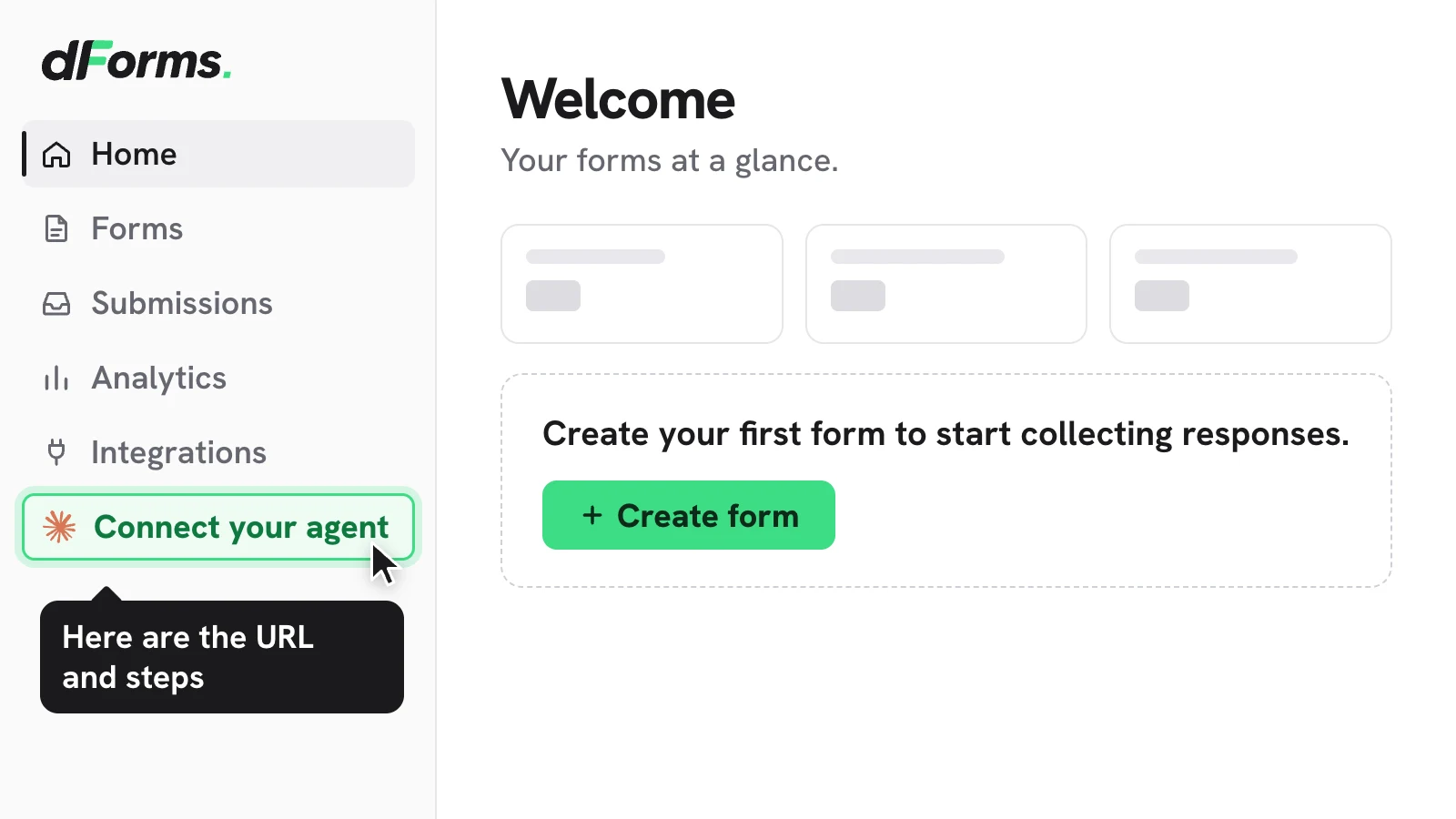
Important: use the same email here and when you connect Claude or ChatGPT. If the connector rejects you, open app.dforms.ai again with that account and try again. “Connect your agent”, in the left menu, has the URL and the steps ready to copy.
What your AI can do in dForms once it's connected
- Create and publish: builds the whole form from your description, with logic and points, and gives you the link.
- Edit: changes questions, copy or the button as a draft, and publishes when you say yes.
- Read responses: lists them, filters by date or score and finds responses that mention something.
- Analytics and CSV: visits, drop-off by question, response summary and CSV export.
Before deleting or replacing anything, your AI tells you exactly what will change and waits for your yes.
Step 2: connect dForms to Claude
The connector gives your AI the dForms tools: create, publish and edit forms, and read responses. It works in claude.ai, Claude Desktop and Cowork. Claude's free plan lets you add a custom connector, so that's all you need.
- In Claude, click + in the chat box, then Connectors → Add connector → Add custom connector. (You can also get there from Claude's settings, under Connectors.)
- Name: dForms. URL: paste the one below. Leave the advanced settings empty and click Add.
- Your browser opens. Enter your email and the 6-digit code you receive. Back in Claude, dForms shows Connected.
- Open a new chat and try: “List my forms in dForms”.
Connector URL: https://mcp.dforms.ai/mcp
Using ChatGPT? (desktop app)
- Switch to Work mode, open Plugins, click Add and choose Create MCP App.
- Name: dForms. Server URL:
https://mcp.dforms.ai/mcp. Leave Authentication on OAuth, check I understand and want to continue and create it. - Click Continue, sign in in the browser and come back with Open ChatGPT.
- In Plugins → Personal, choose dForms and Install plugin. The browser opens again: that's normal. Then type @dForms in the chat.
Connector options in ChatGPT depend on your plan and change often. If you don't see Plugins or Create MCP App, use Claude: the free plan is enough.
01Ask for the budget before you quote (template: quote)
Quoting blind wastes your time with people who can't pay and costs you money with people who could have paid more. One question with 3 ranges fixes it: nobody feels awkward answering, and every response comes in tagged with the option that fits.
What your AI builds: what they need (your services), the budget question with 3 ranges and points, name, email and WhatsApp at the end, 3 outcomes (basic, standard and full, one per range) and the public link, ready for your bio.
Then: you read the range and send a single option, the one they can actually pay for. No more beautiful quotes that never get a reply.
Prompt 1 · Copy and paste it into Claude or ChatGPT (change what's in brackets)
Use dForms to create a quote form for my business: [website design].
In English, one question per screen.

Title: "Quote your [website]". Questions:
1. What do you need? Multiple choice with my services: [one-page site, full website, online store, other]. No points.
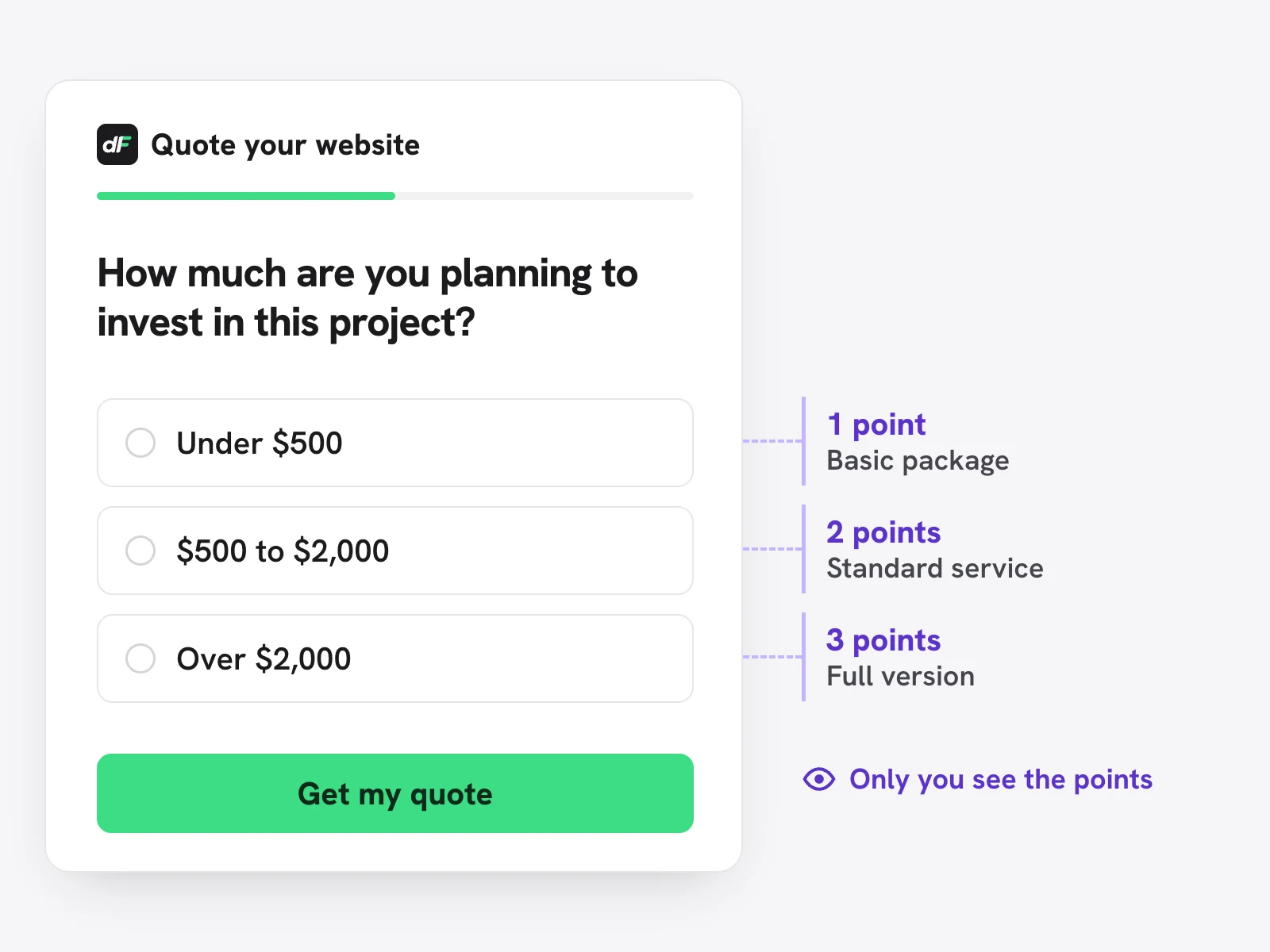
2. How much are you planning to invest in this project? Multiple choice: "Under [$500]" (1 point), "[$500 to $2,000]" (2 points), "Over [$2,000]" (3 points).
3. Name. 4. Email. 5. WhatsApp (phone, optional).

Turn on scoring and create 3 outcomes: 1 point = "Basic package", 2 points = "Standard service", 3 points or more = "Full version". In all 3, the final message thanks them by name and tells them their proposal will reach their email in under 24 hours.
The submit button says "Get my quote".
Create it and give me the public link.
Tip: change the amounts to your currency and your real prices. Make the middle range your usual service.
02A 5-question quiz instead of “Contact us” (template: quiz)
A quiz is the opposite of a “Contact us”: it asks 5 questions and gives a tailored result at the end. People finish it out of curiosity, leave their email to see their result, and every answer tells you what to sell them.
| Question | What it tells you |
|---|---|
| 1 · What stage are you at? | Which package to offer |
| 2 · What's your goal? | What you're going to sell them |
| 3 · What have you tried before? | What not to promise |
| 4 · What's holding you back today? | The objection your offer answers |
| 5 · When do you want it? | Call the "this month" people first |
The email goes at the end, so you can send them their result. That's when they'll give it to you.
Prompt 2 · Copy and paste it into Claude or ChatGPT
Use dForms to create a quiz that replaces my Contact us page. My business: [nutrition plans]. In English, one question per screen.

Cover: title "Which [meal plan] is right for you?", subtitle "5 questions and I'll tell you which one is yours", button "Start".
1. What stage are you at? Multiple choice: Just starting (1 point), Already trying (2 points), Ready for the next level (3 points).
2. What's your goal? Short answer.
3. What have you tried before, and why didn't it work? Long answer.
4. What's holding you back today? Multiple choice: Time, Money, Fear. No points.
5. When do you want it? Multiple choice: This month (3 points), In the next 3 months (2 points), No rush (0 points).
6. Name. 7. Email, with the question "What email should I send your result to?".

Turn on scoring and create 3 outcomes, each with its own message: 1 to 3 points "[Starter plan]", 4 to 5 "[3-month plan]", 6 points "[8-week express plan]". Each message greets them by name, explains in 2 sentences why that plan fits them and says the details are on their way to their email.
Create it and give me the public link.
Tip: the names of the 3 outcomes are your 3 packages. Whoever lands on 6 points wants to start now: call them that same day.
03The form people actually finish (template: more responses)
Before typing anything, people decide whether filling it out is worth it. A boring title, a hard question, odd wording and a “Submit” button tell them: this is work and I get nothing out of it. It takes 4 copy fixes.
| Fix | Before | After |
|---|---|---|
| 1 · The title | Contact us | Your custom furniture, quoted in 24 hours |
| 2 · The first question | What's your phone number? | What piece do you want? (one click) |
| 3 · Their language | Select your market segment | What does your business do? |
| 4 · The button | Submit | Get my quote |
Prompt 3 · Copy and paste it into Claude or ChatGPT
Use dForms to create a form people actually finish. My business: [custom furniture shop]. In English, one question per screen.

1. Cover. The title promises the result, never "Contact us": "[Your custom furniture, quoted in 24 hours]". Button: "Start".
2. The first question is easy, one click: "[What piece do you want?]" with options: [Kitchen, Closet, Table, Bookcase, Other].
3. Two multiple-choice questions written the way my customer talks, no technical words: "[What space is it for?]" and "When do you need it?". You suggest the options.
4. At the end, never at the start: name, email and WhatsApp (phone).
5. The submit button says "Get my quote", never "Submit".
6. Final message: "All set! I'll send you your quote in under 24 hours."

Before creating it, review every question: if my customer would have to guess what it means, rewrite it more simply.
Create it and give me the public link.
Tip: measure before and after. Ask your AI: “Which question in my form makes the most people drop off?”. That's your next fix.
043 questions that run your first call (template: before the call)
On a discovery call, the first half goes to fact-finding. Put those questions in the form, before they book, and the call starts on their situation, not from scratch.
- Today: How many new customers do you get per month? (a number)
- Goal: How many do you want to get in 6 months? (another number)
- Obstacle: What's stopping you from getting there? (open box, in their words)
Open it like this: “I read your answers. Today you're here, you want to get there, and this is holding you back. Is that right?”
Prompt 4 · Copy and paste it into Claude or ChatGPT
Use dForms to create the form "Before your call". My business: [English classes for companies]. In English, one question per screen.

Cover: title "Before your call", subtitle "3 questions and you book your call", button "Start".
1. Today: "How many new customers do you get per month?" Slider from 0 to 100.
2. Goal: "How many do you want to get in 6 months?" Slider from 0 to 100.
3. Obstacle: "What's stopping you from getting there?" Long text box, required, so they write it in their own words.
4. Name. 5. Email. 6. WhatsApp (phone).
7. Booking: if I have Calendly connected in dForms, show me my events and add the booking step at the end with the one I choose. If not, end with: "Thanks. I'll message you today to book your call."
Create it and give me the public link.
Tip: before each call, ask your AI: “Read [Ana]'s response in my Before your call form and write my opener”.
Step 4: what to do with the responses
Points only matter if they change who you call first. Use a traffic light: every response lands on a color, and every color has its action.
- Green, high score: call today, within the first hour if you can. Open with what they answered.
- Yellow, medium score: message them on WhatsApp this week with the option that fits.
- Red, low score: don't quote by hand. Send them your basic package or your free content.
Ask your AI, with the same connector
- Every morning: “List yesterday's responses to my Quote your website form, from highest to lowest score.”
- Every week: “How many people chose each budget range this week?”
- To improve it: “Which question in my form makes the most people drop off? Give me a fix.”
- For your team: “Export this month's responses to a CSV.”
Before you share the link
- ✓ Open it on your phone and fill it out yourself first, start to finish.
- ✓ Check that no question makes you guess what it means.
- ✓ Put it in your bio, your stories and your WhatsApp auto-reply.
- ✓ Every morning, ask your AI for the list by score and call the greens first.
Do it with dForms
How your agent builds it. Link included.
 Claude
 ChatGPT
Video: you ask Claude or ChatGPT for a form that qualifies leads; dForms builds it, scores it, publishes it and gives you the link.
Your first form, today, in 5 minutes. Create your free account, connect dForms to Claude and paste the prompt from the video you watched. Share the link in your bio and by tomorrow you'll know who to call first.
dForms is free: no plans, no response limits, no credit card · app.dforms.ai
Works with Claude and ChatGPT. Free, no card.
Do it with dForms
How your agent builds it. Link included.
Video: you ask Claude or ChatGPT for a form that qualifies leads; dForms builds it, scores it, publishes it and gives you the link.
Keep reading for free
Create your account to read the rest of this playbook and the whole free resource library. Free forever.
No card. Already have an account? Log in
In the rest of the playbook
- Step 1: create your dForms account, free
- Step 2: connect dForms to Claude
- 01Ask for the budget before you quote (template: quote)
- 02A 5-question quiz instead of “Contact us” (template: quiz)
- 03The form people actually finish (template: more responses)
- 043 questions that run your first call (template: before the call)
- Step 4: what to do with the responses
- Do it with dForms